Integrations (MCP)
The model works with your own apps, under your rules
MCP is the open standard that lets AI tools reach other software. TehranQ uses it to plug your own apps into the model: a CRM, an ERP, a ticketing system, anything with an API. Your team asks in VS Code, JetBrains, Cursor, Claude or another tool, and the model looks up a customer or opens a ticket for them, with only the apps and actions that person may use.
Three pieces, all on your server
The integrations file
Written by TehranQ at installFor each app: its address, how to sign in to it, the actions it allows, who may use it, and whether it is read-only. Our engineers write it with you during installation. It lives on your server, not in a form anyone can open.
- Only the actions written here exist for the model
- Read-only, or read and write, for each app
- Critical actions marked, with the people allowed to run them
The gateway
Makes every callA container of its own makes the calls to your apps. It holds their passwords and keys, and nothing else does: not the Workspace, and not the model.
- Declared actions only, never commands
- At most 30 seconds a call, answers cut at 1 MB
- 30 calls a minute per person and app
The MCP address
Your tools connect to itThe Workspace’s own address, at /mcp. Each person connects with their own key, and sees only their apps and the shared contexts they may read.
- One address for every MCP tool
- A personal key for each person, revocable
- Set up in the Workspace, step by step
What the model can actually do
These are all the tools the address offers. The app tools appear only for people who have an app.
whoamiWho the key belongs to, their access, and what is on offer for them
list_shared_contextsThe shared contexts this person may read
search_shared_contextsFind the shared contexts that contain some words, and where
read_shared_contextRead one of them in full
list_systemsThis person’s apps, and what each is for
find_actionFind an app’s actions by a few words, and how to call each
call_actionRun one action through the gateway and return its answer
How an app gets connected
The same four steps for every app, done with you.
- 01
Your model reads its documentation
The Workspace has a ready prompt for it. Attach the app’s documents to a chat, and the model drafts what the app is and the list of its actions, from those documents only.
- 02
We go through the actions with you
Which only read and which change something, which are critical, and who may use what.
- 03
We connect it on the server
The integrations file and its secrets go onto your server and the gateway starts. Nothing is sent anywhere else.
- 04
Your team uses it from their tools
With the key they already have. Every call lands in the audit log.
Which tools, and what leaves the building
An MCP address has no model of its own: the tool’s model does the thinking. So where the answers from your apps go depends on the tool.
With your own model
Nothing leavesVS Code, Continue and JetBrains use your own model on your server. What the model reads from your apps stays inside your network, and it works with no internet.
- VS Code’s own chat
- Continue
- JetBrains IDEs
With a cloud tool
Its provider sees itCursor and Claude keep their own model, so what they read from your apps goes to their provider. Connect only the ones your company trusts with that data. From Iran they may also be unreachable.
- Cursor
- Claude Desktop and Claude Code
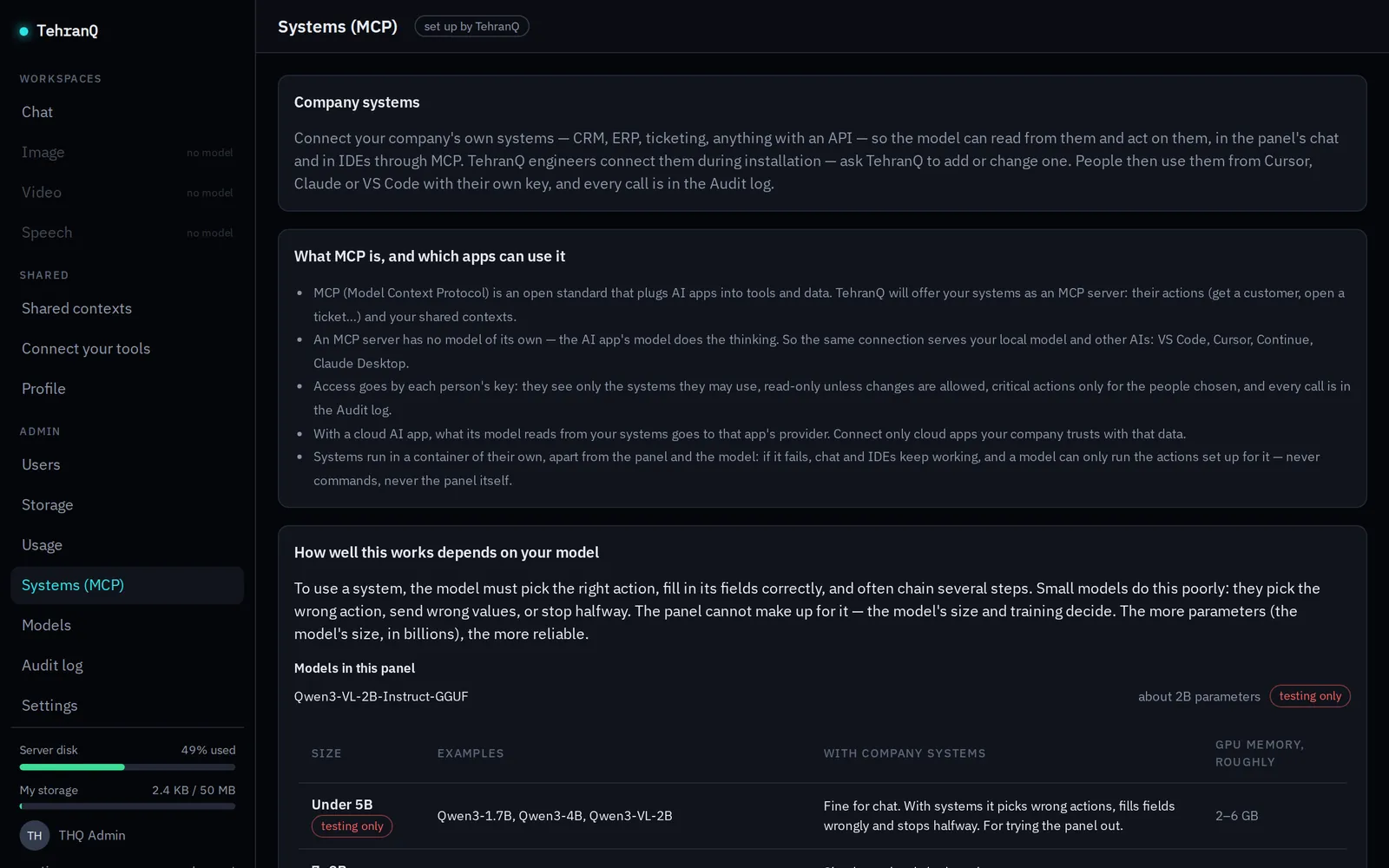
This needs a capable model
To work with an app, the model has to pick the right action, fill in its fields correctly, and often chain several steps. Small models do this badly, and nothing in the Workspace can make up for it. The Workspace shows the same guide.
| Size | Examples | With your apps | GPU memory, roughly |
|---|---|---|---|
| Under 5Btesting only | Qwen3-4B, Qwen3-VL-2B | Fine for chat. With apps it picks wrong actions and stops halfway. | 2–6 GB |
| 7–9Bsimple lookups | Qwen3-8B, Llama 3.1 8B | Simple read-only lookups, one or two steps. Mistakes with complicated fields are common. | 8–16 GB |
| 14–35Brecommended | Qwen3-14B, Qwen3-32B, Qwen3-30B-A3B, gpt-oss-20b | The practical minimum for real work: the right action, correct fields, three to five steps chained. Start here. | 16–48 GB |
| 70B and largerbest | Llama 3.3 70B, gpt-oss-120b, GLM-4.5-Air | Long chains across several apps, and careful changes. | 64 GB and up |
The rules
Only what was set up
The model can run only the actions in the integrations file: never a command, never the Workspace itself. An action the file does not describe does not exist.
Each person, their own apps
Access goes by the person’s key. They see only the apps listed for them, and on a read-only app only reading actions run.
Critical actions only for named people
Deleting, cancelling, paying, sending: the integrations file marks them and names who may run them. The model is told to say exactly what will happen and ask that person first, and without their confirmation the call is refused.
Limits on every call
30 seconds a call, answers cut at 1 MB, 30 calls a minute per person and app. Redirects to another host are refused.
Secrets in one place
The passwords and keys for your apps live only in the gateway’s file on the server. The Workspace never holds them and the model never sees them.
Everything in the audit log
Every call: who, which app and action, the values sent, how it ended and how long it took. Refused calls too.
If it fails, the rest keeps working
The gateway runs apart from the Workspace and the model. If it stops, chat and the tools carry on.
Where it does not work well
An app needs an API; if it has none, or it is undocumented, it has to get one first. A small model will not do real work with it, whatever the Workspace does. We connect apps at install rather than from a form, on purpose: the Workspace holds no app passwords. And the Workspace’s own chat does not reach your apps yet; that is done from the tools above.
Tell us which app comes first
We start with the one or two that carry the most value. Tell us what they are and we will tell you what it takes.
Request an assessment