Mechanical design
AI for mechanical design and machine building, inside your company
A design office spends its days on drawings, standards, material tables, supplier quotes and the manuals of imported machines, and its drawings are what it sells. TehranQ runs an open-weight model on a server in your office, so engineers check a drawing’s notes and tolerances against your drafting rules, find the clause or the material grade they need, and write and translate documents — in Persian and English, without a file leaving the company.
- Machine and equipment design
- Automotive parts makers
- Moulds, dies and tooling
- HVAC and pressure equipment
- Machine shops and CNC workshops
- Maintenance and reverse engineering
Why local matters here
A part’s drawing is everything another workshop needs to make it, and a mould or a machine design is years of a company’s work. Customers, carmakers in particular, often forbid their drawings from leaving your company at all. With your own model nothing goes out, and the server needs no internet to work, so it can sit on the design office’s own network.
What your design office could do with it
A drawing checked against your drafting rules
Export the drawing from SolidWorks, CATIA, Inventor or AutoCAD as a PDF and ask the model to check its text against your checklist: tolerances on every fit, surface finish on bearing seats, key and thread callouts, material and heat treatment that go together, a general tolerance in the title block, no closed dimension chains. It reads the text on the sheet, not the geometry: whether a view is right stays with the checker.
Workspace →Standards and material tables, at hand
Keep the tables you look up every day as shared contexts: fits and tolerances, keys and threads, the equivalents between DIN, ISO, AISI and the names your workshop uses (CK45, St37, VCN). An engineer asks in Persian or English and gets the line from your own tables, not from memory.
Shared context →Manuals of imported machines, in Persian
Translate the manual of an imported machine, a supplier’s technical letter or a spare-parts list into Persian, or your own documents into English for a foreign customer, keeping part numbers and units as they are. Check the technical terms against your glossary.
Workspace →Quotes and purchase specs
Attach the quotes from three machine shops or foundries and ask what each one includes, leaves out or changes — material, tolerances, heat treatment, inspection, delivery. Or turn a drawing’s requirements into a purchase spec for the supplier.
Workspace →Work instructions and inspection reports
Turn an engineer’s notes into assembly or machining instructions for the shop floor, a first-article inspection report or a non-conformance report, in Persian or English and in your own templates.
Workspace →Macros and scripts for your CAD
Engineers who automate SolidWorks or Inventor with macros, or process test data in Python, use your own model in VS Code, JetBrains or Continue, with a personal key from the Workspace, and no drawing goes to a paid assistant.
Coding →Sample: a shaft drawing checked against the drafting rules
A made-up drawing of a drive shaft, THQ-M-204, exported from the CAD software as a PDF, and the office’s drafting checklist. This is how the check goes in the Workspace.
- 01
The checklist, written once
The design office keeps its drafting checklist as a shared context: tolerances and finishes on fits, key and thread callouts, materials and heat treatments, the title block, dimensioning rules.
- 02
The drawing, as a PDF
An engineer attaches the drawing, switches the checklist on and asks for every problem. The model reads the text on the sheet — dimensions, tolerances, notes, the title block — not the shapes.
- 03
The table, then the checker
The answer lists each problem with the feature and the fix, then says whether the drawing is ready for the workshop. The checker still looks at the views; geometry is not in the text.
Check this drawing against our drafting checklist. List every problem in a table: feature | problem | fix. Then say in one line whether it is ready for the workshop.
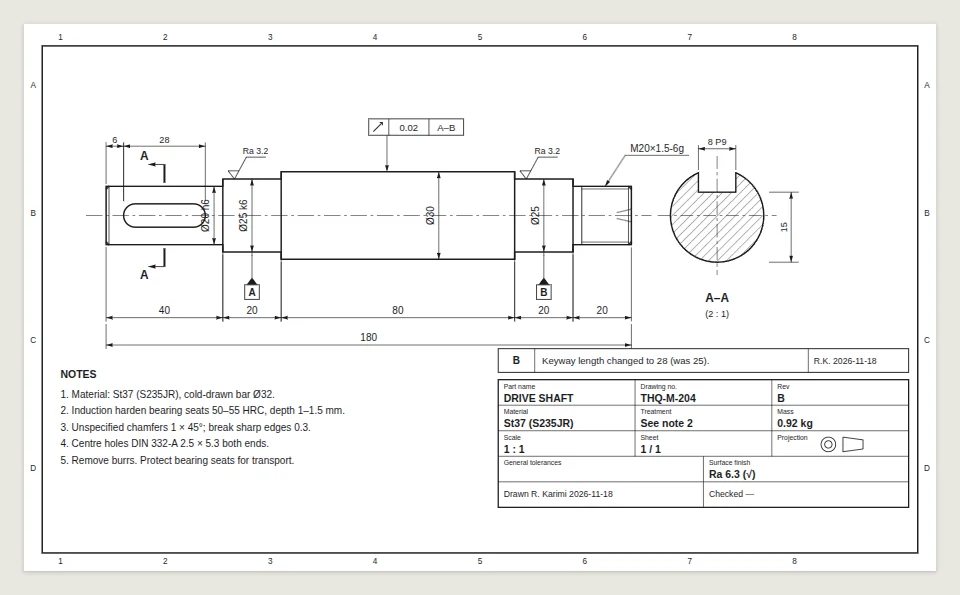
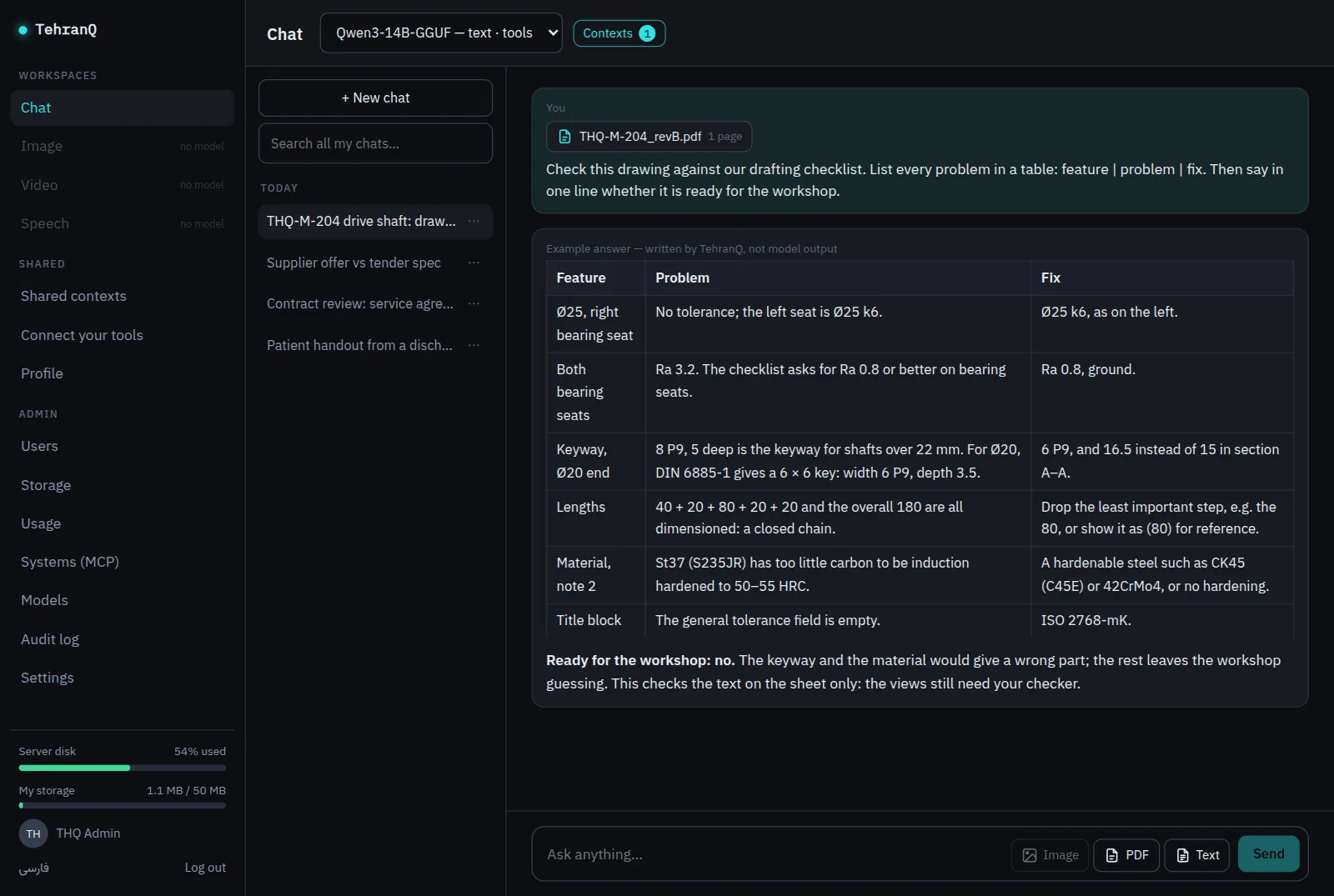
The answer shown was written by TehranQ engineers to show the shape of the review, not produced by a model; what your model answers depends on the model you run and on your own checklist. A person checks every answer.
Shared contexts a design office keeps
- Your drafting checklist and drawing standards
- Tables of fits, keys, threads and surface finish
- Material equivalents and heat treatments
- The capabilities of your workshop and suppliers
- A glossary of Persian and English mechanical terms
Apps a design office or factory might connect
- PDM and drawing control
- ERP: parts, stock and purchasing
- Production planning and the shop floor
- Quality records and inspection reports
What it takes
A design office where a few engineers ask questions at a time starts on a 12 GB graphics card with an 8B model. Checking drawings against a long checklist and translating manuals go better with a 14B model on 16–24 GB, and a larger team using it at once wants more: it follows how many use it at once, not the headcount. The System builder works out the machine.
Size your system →Where it falls short
It does not open CAD files — part, assembly, STEP or DWG — and from a drawing exported to PDF it reads the text on the sheet, not the shapes: it cannot tell whether a view is wrong or a hole is in the wrong place. It is not for strength, fatigue or tolerance stack-up calculations: it can give a formula and a number that look right and are wrong. Standards and material tables are only as current as the ones you keep in shared contexts. Every drawing still goes past your checker before it goes to the workshop.
Questions design offices ask
Can it read our SolidWorks or CATIA files?
No CAD files, neither parts nor assemblies, STEP or DWG. Export the drawing to PDF and it reads the text on the sheet: dimensions, tolerances, notes and the title block.
Can it check our drawings?
The text on them, against your checklist: missing tolerances, finishes, callouts, a material that does not fit its heat treatment, a missing general tolerance. Not the geometry: wrong views, misplaced holes or a part that cannot be assembled are for your checker.
Can it do strength or tolerance calculations?
No. It can explain a method in general terms, but it makes arithmetic and unit mistakes while sounding sure. Calculations stay in your engineering software and with the engineer who signs them.
Can it translate the manuals of our machines?
Yes, between Persian and English, and it reads the text of a PDF manual as much as its context holds, so translate a long manual chapter by chapter. Keep a glossary as a shared context and check the terms.
Our customers forbid sharing their drawings. Is this allowed?
The model runs on your own server and nothing is sent outside; the server can run with no internet at all. Check your contracts, but for most of them it is the same as keeping the drawings on your own file server.
Other industries
Tell us about your business
Say what your team does and how many people; we will tell you what it would take — and if it is not worth it for you, we will say that too.
Request an assessment