Electronics and PCB design
AI for electronics and PCB design, without your designs leaving the building
Hardware teams live in datasheets, BOMs, design reviews and firmware, and a board’s schematic and layout are years of the company’s work. TehranQ runs an open-weight model on a server in your office, so engineers check a BOM against your design checklist, find the line they need in a 200-page datasheet, write test reports and write firmware with an assistant — in Persian and English, with nothing sent outside.
- PCB and hardware design companies
- Embedded systems and IoT
- Power electronics and drives
- Telecom and networking equipment
- Industrial control and automation
- Electronics manufacturing and repair
Why local matters here
A board’s schematic, layout and firmware are what a hardware company sells, and once they leave, copying them is easy. Many teams also work under rules about where defence, telecom or industrial designs may go at all. With your own model the files stay on your network; the server needs no internet to work, so the design lab can stay off it altogether.
What your hardware team could do with it
A BOM checked against your design checklist
Export the BOM and the board notes from Altium Designer, KiCad or OrCAD as a PDF or CSV, and ask the model to check them against your checklist: capacitor voltage ratings, decoupling for every supply pin, ESD on external connectors, input protection, crystal load capacitors, parts not recommended for new designs. It reads the text, not the copper: layout and clearances stay with your EDA tool’s design-rule check.
Workspace →The line you need in a 200-page datasheet
Attach a datasheet or an application note and ask for the absolute maximum ratings, a pin’s functions, a bus’s timing or the recommended layout around a regulator. Up to four files go in one message and the model reads as much as its context holds, so for a long datasheet attach the chapters that matter.
Workspace →Firmware with an assistant in your own IDE
Embedded developers use your own model in VS Code, JetBrains or Continue for C and C++ on microcontrollers: peripheral setup, drivers, state machines, unit tests. A personal key from the Workspace connects it, and the firmware never goes to a paid assistant.
Coding →Substitutes when a part cannot be had
Give it the specs of a part you cannot get and the candidates you can, and ask which match on package, ratings and pinout, and what would change on the board. It compares what you give it; it does not look up stock or prices, and every substitute needs its datasheet and a test.
Workspace →Test reports and production documents
Turn bench measurements and notes into a test report, write assembly and inspection instructions for the line, or translate a manual between Persian and English, in your own templates.
Workspace →Your design rules, written once
Keep the design checklist, the layer stack-ups, the preferred-parts list and your board house’s capabilities as shared contexts. Every engineer checks against the same rules, and they are updated in one place.
Shared context →Sample: a board’s BOM checked against the design checklist
A made-up IoT board, THQ-IOT-01: its review packet exported from the EDA tool — the layout, the bill of materials and the board notes — and the team’s design checklist. This is how the check goes in the Workspace.
- 01
The checklist, written once
The hardware team keeps its design checklist as a shared context: ratings, decoupling, protection on connectors and inputs, crystal load capacitors, regulator dissipation, trace widths, test points, part lifecycle.
- 02
The packet from the EDA tool
An engineer exports the review packet as a PDF, attaches it, switches the checklist on and asks for every problem. The model reads the packet’s text — designators, values, notes — not the copper.
- 03
The table, then the engineer
The answer lists each problem with the part and the fix, then says whether the board is ready for fabrication. The engineer checks each line against the datasheets; layout rules stay with the EDA tool.
Check this board against our design checklist. List every problem in a table: part | problem | fix. Then say in one line whether it is ready for fabrication.
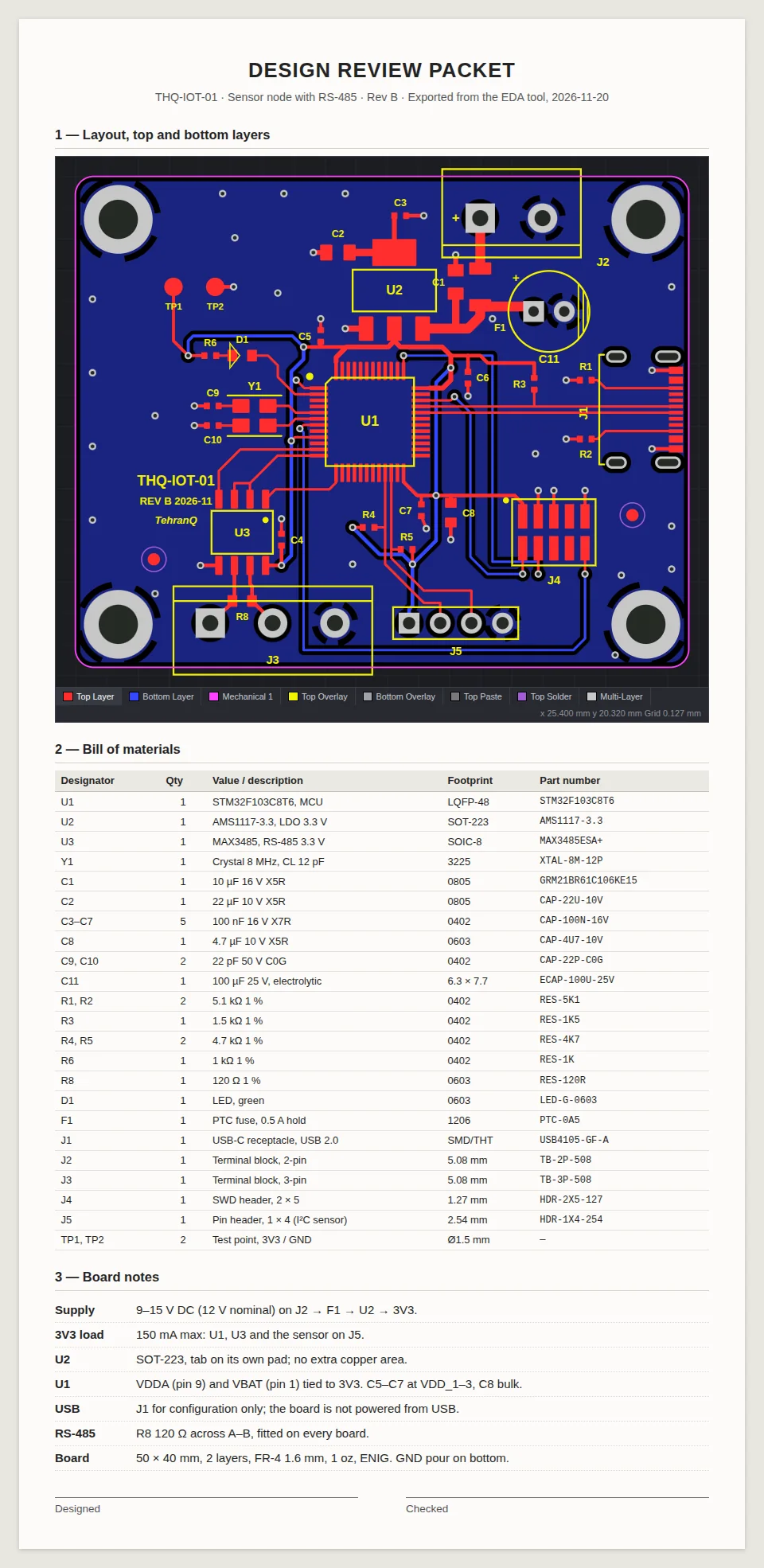
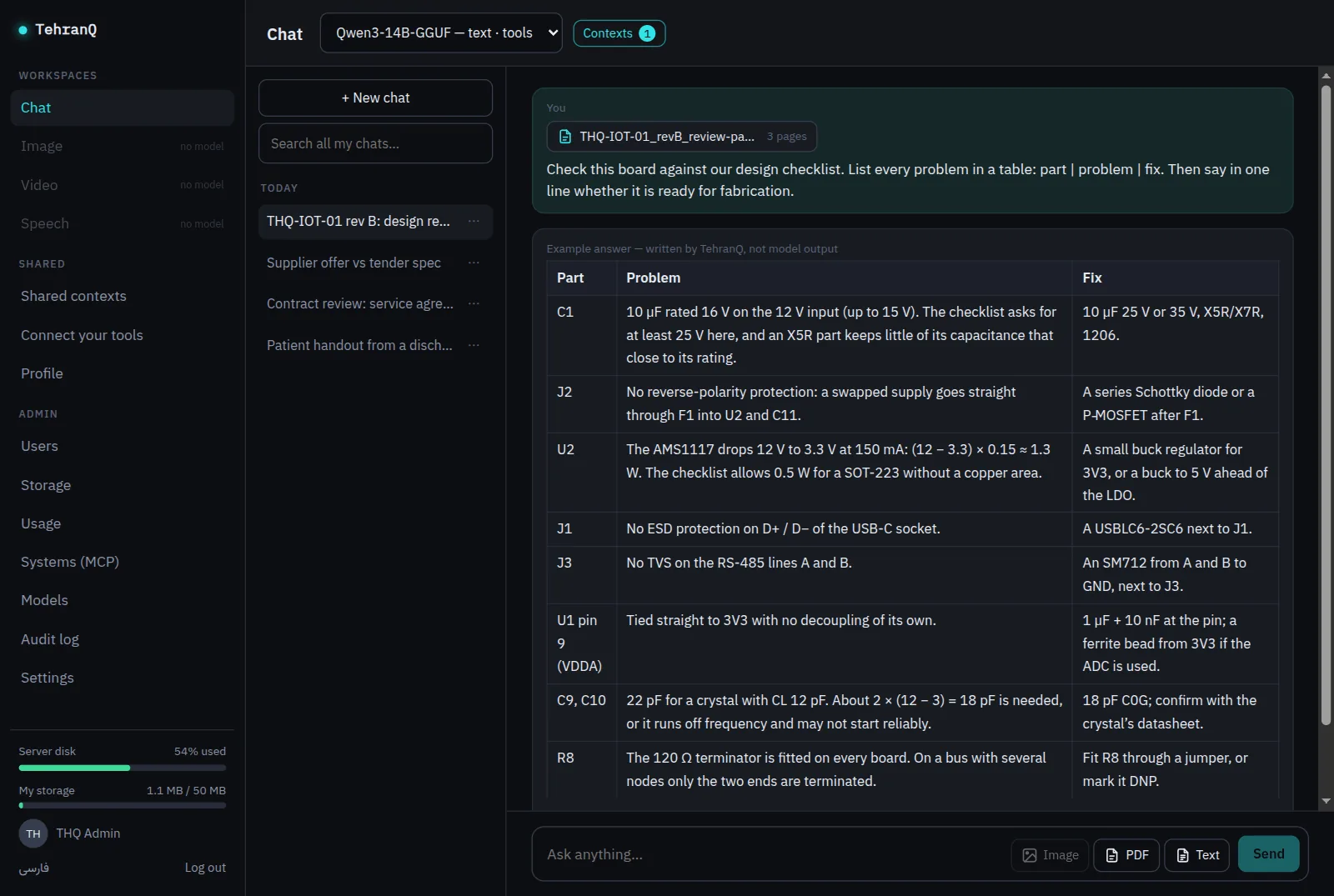
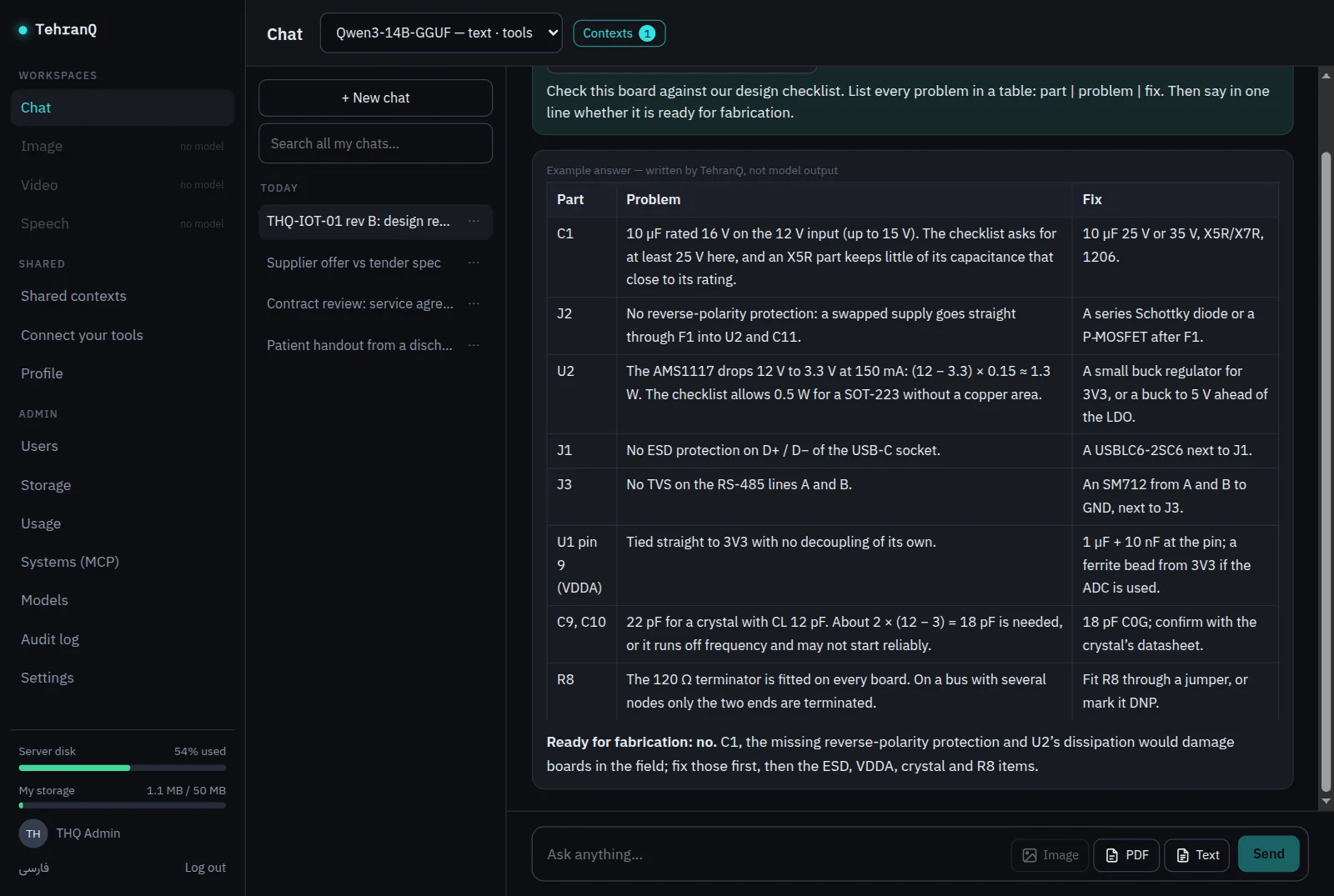
The answer shown was written by TehranQ engineers to show the shape of the review, not produced by a model; what your model answers depends on the model you run and on your own checklist. A person checks every answer.
Shared contexts a hardware team keeps
- The design checklist your reviews follow
- Preferred and banned parts, with their lifecycle
- Layer stack-ups and your board house’s capabilities
- Firmware coding rules and the register maps you use most
- Templates for test reports and assembly instructions
Apps a hardware company might connect
- Parts inventory and purchasing
- PLM and document control
- An issue tracker for hardware and firmware bugs
- Production and test records
What it takes
A small design team asking questions a few at a time starts on a 12 GB graphics card with an 8B model. Checking long BOMs and datasheets against a checklist goes better with a 14B model on 16–24 GB, and a firmware team coding with it all day wants a coding model and 24 GB or more: it follows how many use it at once, not the headcount. The System builder works out the machine.
Size your system →Where it falls short
It does not open schematic or PCB files, route a board, run a design-rule check or simulate a circuit: that stays in your EDA tools. From a PDF it reads the text — designators, values, notes — not the drawing; a screenshot of a layout can go to a model that reads images, but treat what it sees as rough. It can be confidently wrong about a pin or a rating, so check against the datasheet before anything goes to fabrication. And it does not know stock, prices or which parts were discontinued last month unless your files say so.
Questions hardware teams ask
Can it review our schematic or PCB?
Not the files themselves. Export the BOM, the netlist or the board notes as text or PDF and it checks those against your checklist. Clearances, routing and copper are for your EDA tool’s design-rule check.
Can it read datasheets?
Yes, PDFs with real text. It finds ratings, pinouts and timing quickly. Tables that are pictures, or a very long datasheet, need the relevant pages attached, and anything it quotes should be checked against the page.
Does it help with firmware?
Yes: C and C++ for microcontrollers in VS Code, JetBrains or Continue, with your own model. It knows common chips and libraries; for a particular register, keep that section of the reference manual in the chat.
Can it suggest substitute parts?
It can compare the candidates you give it on package, ratings and pinout. It does not search distributors or know what is in stock, and a substitute always needs the datasheet and a test on the board.
Our designs are confidential. Is it safe?
The model runs on your server and nothing is sent outside; the server can run with no internet at all. Who sees which shared contexts is set in the Workspace, and admin changes are in the audit log.
Other industries
Tell us about your business
Say what your team does and how many people; we will tell you what it would take — and if it is not worth it for you, we will say that too.
Request an assessment