Finance, accounting and law
AI for finance and law, without client files leaving the office
Contracts, statements and client files are exactly what a cloud AI service should never see, and the big ones are not available from Iran anyway. TehranQ runs an open-weight model on a server in your own office, so your team can read contracts, draft letters and find answers in your own rules, in Persian and English, without a page leaving your network.
- Banks
- Insurance companies
- Brokerages and investment funds
- Accounting and audit firms
- Law firms
- Notary offices
- Tax consultants
Why local matters here
Client confidentiality is the business itself: a bank answers for its customers’ data under banking rules, and a lawyer for every file a client hands over. Once a contract has been pasted into a cloud service, nobody can say where it went. With your own model nothing leaves the building, it keeps working with no internet, and an audit log nobody can edit records every sign-in, every admin change and every call to your apps.
What your team could do with it
Contracts read, clauses drafted
Attach a contract and ask for each party’s obligations, the deadlines, the penalties or what happens on termination, then compare it with your standard terms. Draft a clause or a reply in formal Persian or in English. A lawyer reads the original before anything is signed.
Workspace →Your own rulebook, in every chat
Keep internal policies, the regulations and circulars your team works to, and your standard contracts as shared contexts. Staff ask in plain Persian and the answer comes from those documents. An admin can assign the compliance procedures to a new hire, so they are in every chat of theirs.
Shared context →Letters and replies to clients
Draft a letter to a client, a reply to a customer complaint or a notice, in the tone your firm sets in its company instructions. Each person’s own notes keep their way of writing and signing off.
Workspace →Reports and statements, summarised
Attach an annual report, an audit file or a fund’s prospectus as a PDF and ask for a summary, the risks it names, or the points worth questioning. Check every figure it gives against the source: it can misread a number or get a calculation wrong.
Workspace →Board meetings and client interviews into text
Record a board meeting, a client interview or a dictated memo, and the speech tool turns it into Persian or English text with timestamps. A chat then turns the text into minutes. Names and numbers need checking.
Speech →Your CRM and accounting, under your controls
Connect a CRM, a case management system or your accounting software if it has an API, read-only where you like. Staff look up a client or a balance from VS Code, JetBrains or Continue through your own model. Critical actions such as paying or sending are only for the people you name, and need their confirmation; every call is in the audit log.
Integrations →Sample: a contract checked for loopholes
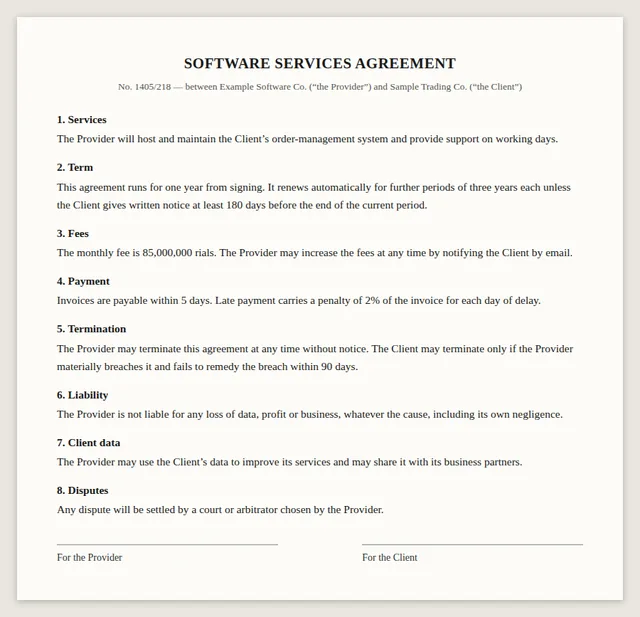
A made-up service contract with the kind of clauses that hurt a client, and a legal team’s checklist of what it accepts. This is how the review goes in the Workspace.
- 01
Your rules, written once
The legal team keeps its contract checklist as a shared context: price changes, payment, renewal, termination, liability, data and disputes.
- 02
The contract, as a scan
Someone attaches a photo or scan of the contract to a chat, switches the checklist on, and asks for a review.
- 03
The review, then a lawyer
The model lists each clause that breaks a rule, says why, and suggests the change to ask for, then gives its recommendation. A lawyer checks it before anything goes to the other side.
Review this contract for us, the Client, against our contract checklist. For each clause that is risky for us, give the clause number, the problem, and the change we should ask for. Finish with your recommendation in one sentence: sign it as it is, or not.
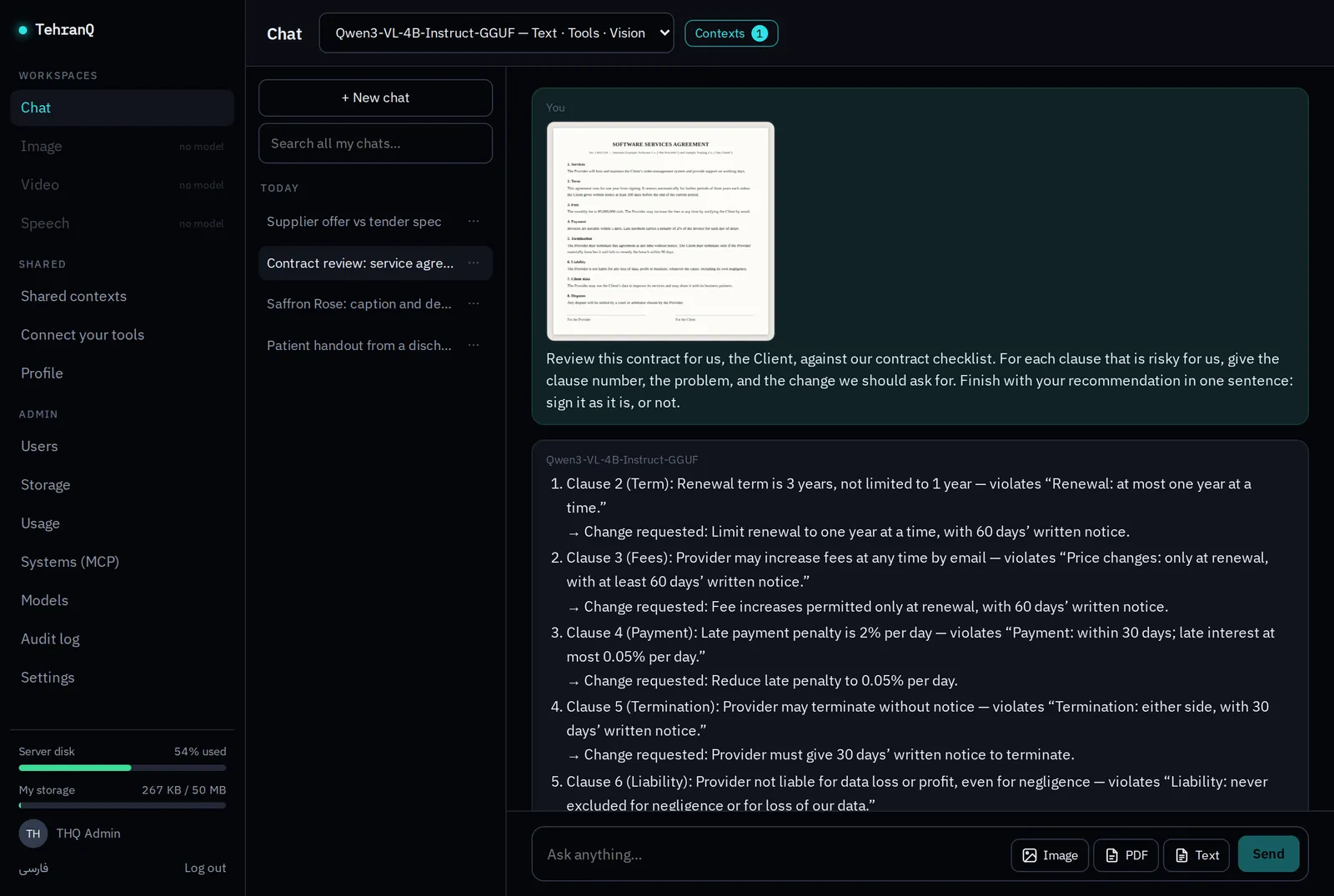
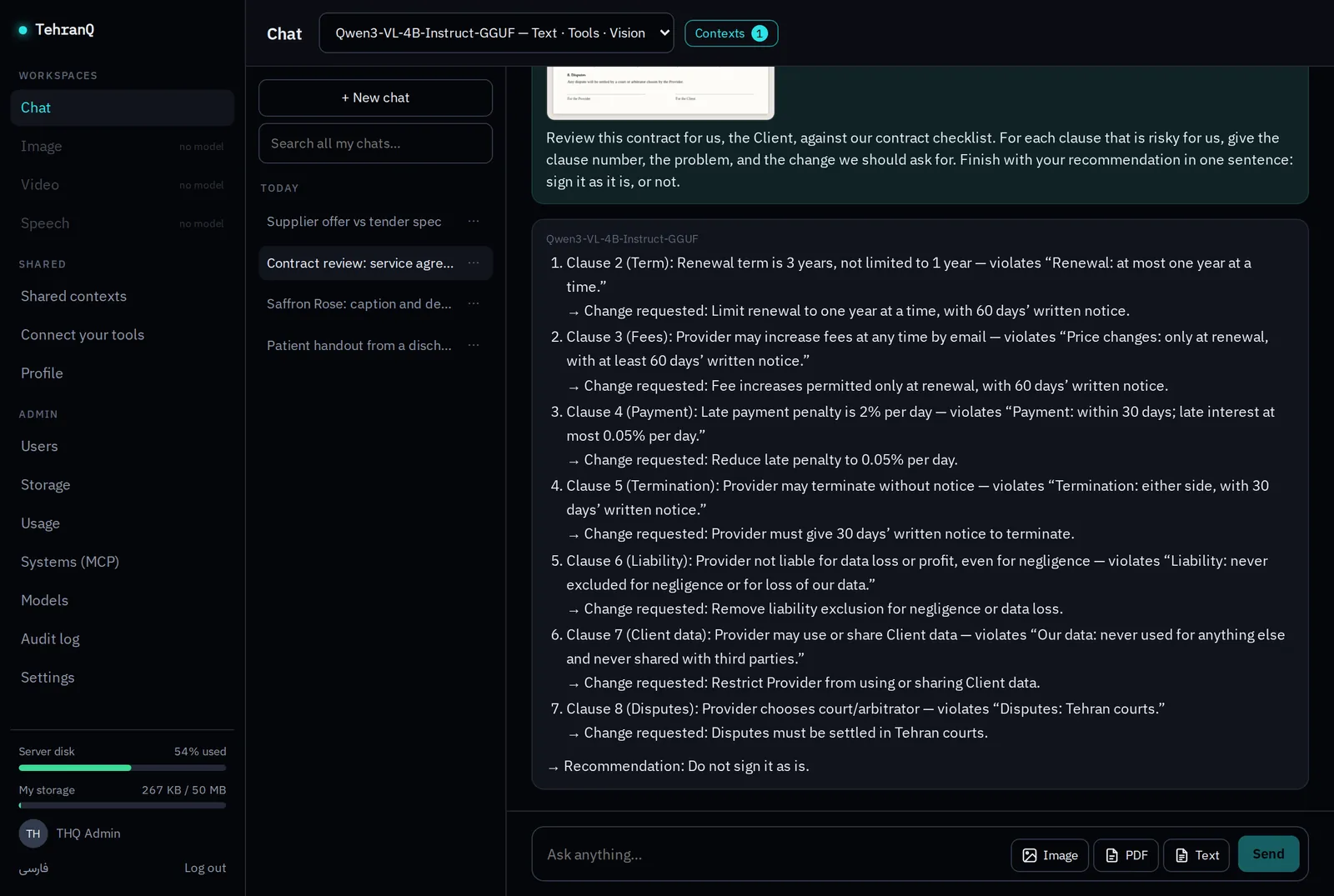
Answered by Qwen3-VL-4B, which reads images, on a laptop’s 6 GB GPU in about 12 seconds. Small models vary from one answer to the next, so a person checks every answer; a bigger model on a proper server is steadier.
Shared contexts a bank or a firm keeps
- Standard contracts and your fallback clauses
- Internal policies and compliance procedures
- The regulations and circulars your team works to, kept current
- Product terms and fee schedules
- House style for letters and legal opinions
Apps a bank or a firm might connect
- The CRM and client files
- Case and matter management
- The accounting system, read-only
- Policy and claims administration, for insurers
What it takes
An office where a few people ask questions at a time starts on a 12 GB graphics card with an 8B model. A team working with it all day wants 24 GB or more: the number follows how many use it at once, not the headcount. Reading long contracts and reports in one go needs a larger context, and context takes GPU memory too. Connecting your apps needs a capable model, 14–35B, and transcribing meetings is a load of its own, about 10–12 GB. The System builder works out the machine.
Size your system →Where it falls short
What it writes on law, tax or finance is a draft for a professional to check, never an opinion to sign as it stands. It can get numbers and calculations wrong while sounding certain, so verify every figure against the source. It reads only what is in the chat, the attached files and the shared contexts switched on: a regulation or circular you did not give it does not exist for it, and an outdated one gives outdated answers. Scanned contracts need OCR before it can read them. And the Workspace’s own chat does not reach your apps yet; that is done from the tools.
Questions banks and firms ask
Can it give legal or tax advice?
It drafts, summarises and finds the relevant passage in the documents you give it. The advice is still the professional’s: treat every answer as a first draft that someone qualified reads against the source.
Can we trust its numbers?
Not without checking. Language models misread figures and get arithmetic wrong, sometimes confidently. Use it to find and explain numbers, and verify each one against the original document or your accounting system.
Does it know the current regulations?
Only the ones you give it. What it knows by itself comes from the data it was trained on, may be out of date, and is not specific to your rules. Keep the regulations and circulars you work to as shared contexts, and replace them when they change.
Do client files leave the office?
Not through the Workspace or the speech tool: they run on your own server and work with no internet. Cloud tools such as Cursor and Claude send what they read to their provider, so do not connect them to client data. The Workspace says so when they are set up.
Who sees which files?
Each person has their own chats. A shared context is private or shared with everyone, and an admin can assign one to a particular person. In your apps, each person reaches only their own, and an app can be read-only. The audit log records sign-ins, admin changes and every call to your apps, and nobody can edit it.
Other industries
Tell us about your business
Say what your team does and how many people; we will tell you what it would take — and if it is not worth it for you, we will say that too.
Request an assessment