Software and development teams
AI for software teams, without sending your code anywhere
Paid coding assistants send your source code to another company’s servers, bill every developer every month, and are not available from Iran anyway. TehranQ runs an open-weight coding model on a server in your office and puts it inside the IDEs your team already uses.
- Software companies
- In-house IT and development teams
- Startups
- Knowledge-based companies
Why local matters here
Source code is the company. A cloud assistant reads every file it is shown, and once code has been sent, you cannot check what happens to it. With your own model the code stays on your network, there is no per-seat bill that grows with the team, and nothing stops working when a foreign service blocks Iranian users.
In the editors your team already uses
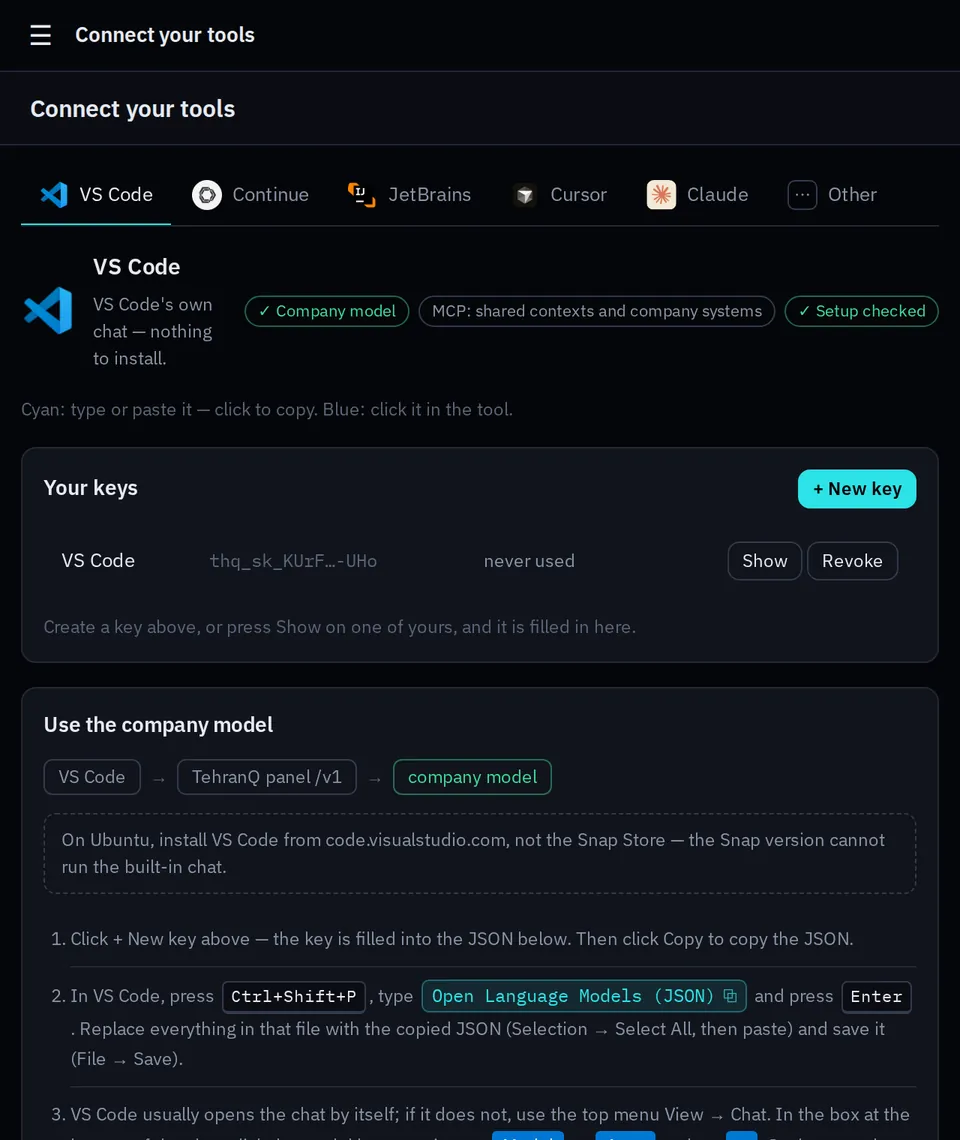
Your model sits inside the IDE, the way a paid assistant would, except that it runs on your server. Nothing to install on the server for each developer: a personal key and a few steps on the Workspace’s Connect your tools page.
With your own model
 VS CodeIts own chat and agent mode; nothing to install.
 JetBrains IDEsIntelliJ IDEA, PyCharm, GoLand… with JetBrains’ own AI Assistant.
 ContinueThe open-source assistant in VS Code; no account needed.
Over MCP only
 CursorThe AI editor built on VS Code.
 ClaudeClaude Code in the terminal, and Claude Desktop.
Cursor and Claude read your shared contexts and apps over MCP but answer with their own cloud model, so what they read goes to their provider. The Workspace says so when someone sets them up.
Connecting takes three steps
- Make a personal API key in the Workspace.
- Pick your editor on Connect your tools and follow its steps.
- Ask in the editor: the answer comes from the model on your server.
What your team does with it
Your own model in the IDE
VS Code’s own chat, JetBrains IDEs and Continue use the model on your server. Each developer makes a personal API key in the Workspace and follows the steps for their IDE.
Coding →Old code explained, tests written
Ask what a legacy module does, find the bug in a function, write the tests nobody wrote, refactor a file: all against your own codebase.
Coding →Your conventions, known to the model
Keep architecture notes, coding rules and API docs as shared context. VS Code, Continue and Cursor read the same contexts over MCP, so the answers follow your way of working.
Shared context →Your tracker and internal APIs
Connect your issue tracker or internal services that have an API, and the model can look up a ticket or a record from inside the IDE. Each developer reaches only what they may, and every call is in the audit log.
Integrations →Cursor and Claude, if you use them
They connect over MCP to read your shared contexts and apps, but keep their own cloud model, so what they read goes to their provider. The Workspace says so when someone sets them up.
Integrations →From a phone, over your VPN
Ask about a piece of code from a phone’s browser, in the office or from anywhere over your company’s VPN.
Workspace →Sample: the bugs in an old function
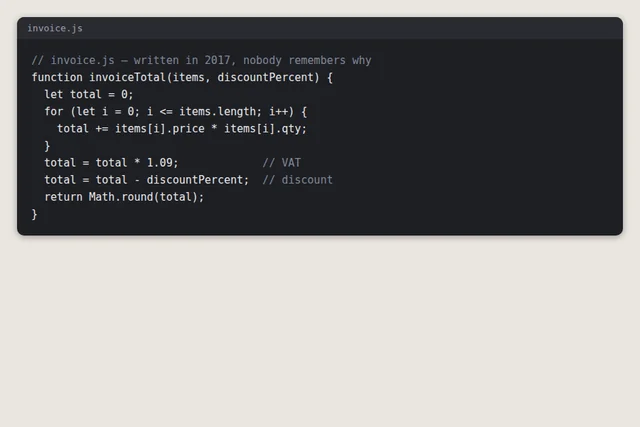
A made-up invoice function from 2017 with real-world bugs, and the team’s coding conventions. This is how it goes in the Workspace; the same works from VS Code, JetBrains or Continue.
- 01
The conventions, written once
The team keeps its coding rules as a shared context: Node and Jest, amounts as whole rials, the VAT rate from config, discounts before VAT.
- 02
The code, in the question
A developer pastes the function and asks what it does, what is wrong with it, and how to fix each bug.
- 03
The bugs, then a review
The model explains the function and lists each bug with its fix, following the team’s rules. A developer reviews the fixes before anything is merged.
What does this old function do, and what bugs does it have? For each bug, say in one or two lines how to fix it, following our conventions.
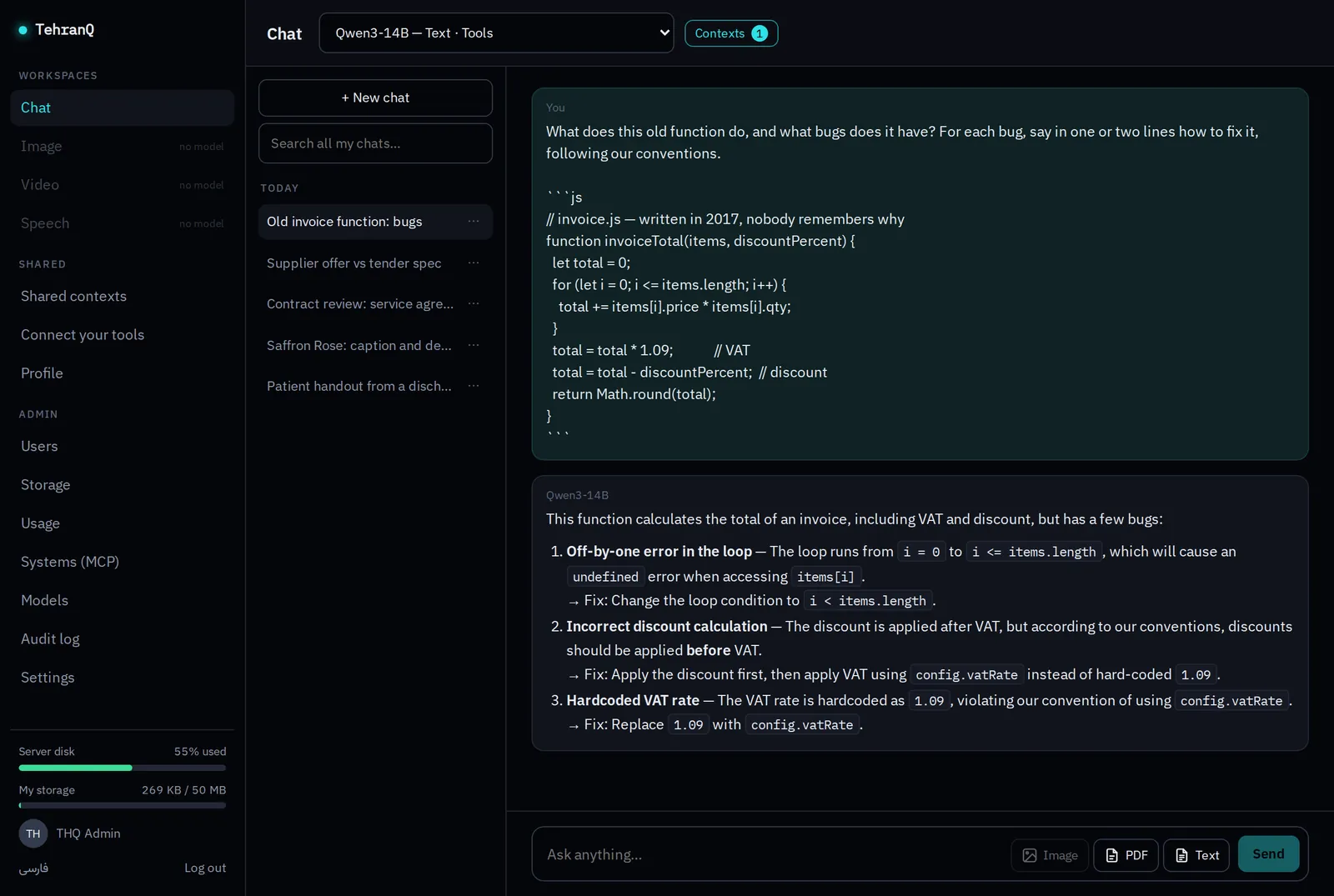
Answered by Qwen3-14B, the size we recommend, on a laptop — partly on the CPU, in under two minutes; on a 16 GB card it takes seconds. A developer checks every fix.
Shared contexts a software team keeps
- Architecture overview and service map
- Coding conventions and the review checklist
- API documentation for internal services
- Release and deployment steps
- A glossary of product and domain terms
Apps a software team might connect
- The issue tracker
- Admin and back-office APIs
- Monitoring and status endpoints
- The customer database, read-only
What it takes
For two or three developers, a 12–16 GB graphics card with a quantised coding model gets you running. For a team coding against it all day, 24 GB and up: coding is the heaviest concurrent load, because the requests are short but constant. The System builder works out the machine for your team.
Size your system →Where it falls short
It is genuinely good at explaining code, writing tests and repetitive work, and behind the frontier models on architecture and hard, multi-layered bugs. Tab completion as you type is not set up by the Workspace today; the model works through chat and agent mode in the IDE. And a small model on a small card gives small answers: size the hardware for the work.
Questions software teams ask
Can it replace GitHub Copilot?
For chat about code, explanations, tests and refactors, yes, with a good coding model. It does not do tab completion as you type out of the box, and it is behind the best cloud models on the hardest problems.
Does our source code leave the network?
Not with VS Code, JetBrains or Continue: they use the model on your server, and it works with no internet. Cloud tools such as Cursor and Claude send what they read to their provider, and the Workspace warns about that.
Which IDEs and tools work?
VS Code (its own chat), JetBrains IDEs and Continue use your model. Cursor, Claude and other MCP tools connect for your shared contexts and apps. The Workspace gives each person the setup, step by step.
How many developers can one server handle?
It depends on how many work at the same moment and on the model’s size, not on the headcount. The System builder estimates the speed each person gets with your team and your card.
Which models do you use?
Open-weight coding models such as Qwen3-Coder, DeepSeek-Coder and Devstral. We compare several on your own code and install whichever does best.
Other industries
Tell us about your business
Say what your team does and how many people; we will tell you what it would take — and if it is not worth it for you, we will say that too.
Request an assessment