Engineering and industry
AI for engineering firms and industry, on your own network
Tender documents, project specs and plant procedures take days to read, and they are not something to hand to a cloud service, most of which are not available from Iran anyway. TehranQ runs an open-weight model on a server in your office, so engineers can read and compare documents, draft reports and letters, and find answers in your own standards and procedures, in Persian and English.
- Engineering consultancies
- Architects
- Construction contractors
- Factories and manufacturing
- Oil, gas and petrochemicals
- Mining and utilities
Why local matters here
Drawings, bids and process data are what a company competes on, and in oil, gas and utilities there are often rules about where such data may go at all. A plant or a site office may have poor internet, or none. With your own model nothing leaves your network, the server needs no internet to work, and engineers on site reach it over your company’s VPN.
What your engineers could do with it
Tenders and specs, read and compared
Attach the tender documents or a technical spec as PDFs and ask for the requirements, the deliverables, the deadlines and the penalties, or compare two versions side by side. Up to four files go in a message, and the model reads as much as its context holds.
Workspace →Your standards and procedures, at hand
Keep the clauses of the standards you design to, your HSE procedures and the company’s design criteria as shared contexts. An engineer asks in Persian or English and the answer comes from those documents. Replace them when a new edition comes out.
Shared context →Site reports, minutes and letters
Turn a site engineer’s notes into a daily report, a meeting into minutes, or a list of points into a formal letter to the client or a subcontractor, in Persian or English and in your own templates.
Workspace →Site meetings and voice notes into text
Record a coordination meeting or a voice note during an inspection, and the speech tool turns it into text with timestamps. A noisy site gives worse results, so record close to whoever is speaking, and check names and numbers.
Speech →Scripts for your engineers
Engineers who write Python to process instrument data, logs or spreadsheets can use your own model in VS Code, JetBrains or Continue, with a personal key from the Workspace, and no plant data goes to a paid assistant.
Coding →ERP and maintenance systems, from the tools
Connect your ERP, maintenance system or project control software if it has an API, read-only where you like. From VS Code, JetBrains or Continue, a planner can look up a work order or a spare part through your own model. Each person reaches only their own apps, and every call is in the audit log.
Integrations →Sample: a supplier’s offer against the tender spec
A made-up technical offer for two cooling-water pumps, and the tender’s technical spec. This is how the check goes in the Workspace.
- 01
The spec, written once
The engineering team keeps the tender’s technical spec as a shared context: performance, materials, motor, design standard, warranty, delivery and spare parts.
- 02
The offer, as a scan
An engineer attaches the supplier’s offer, switches the spec on, and asks for every deviation.
- 03
The table, then the engineer
The model lists each deviation with what to ask the supplier, then says whether the offer is acceptable as it is. The engineer decides; the model is not for design or safety calculations.
Compare this supplier's offer with our tender spec. List every deviation in a table: item | our spec | their offer | what to ask the supplier. Then say in one line whether it is technically acceptable as it is.
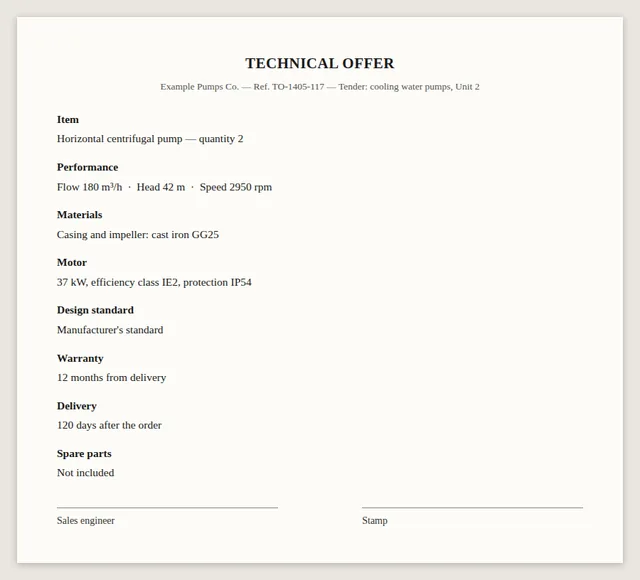
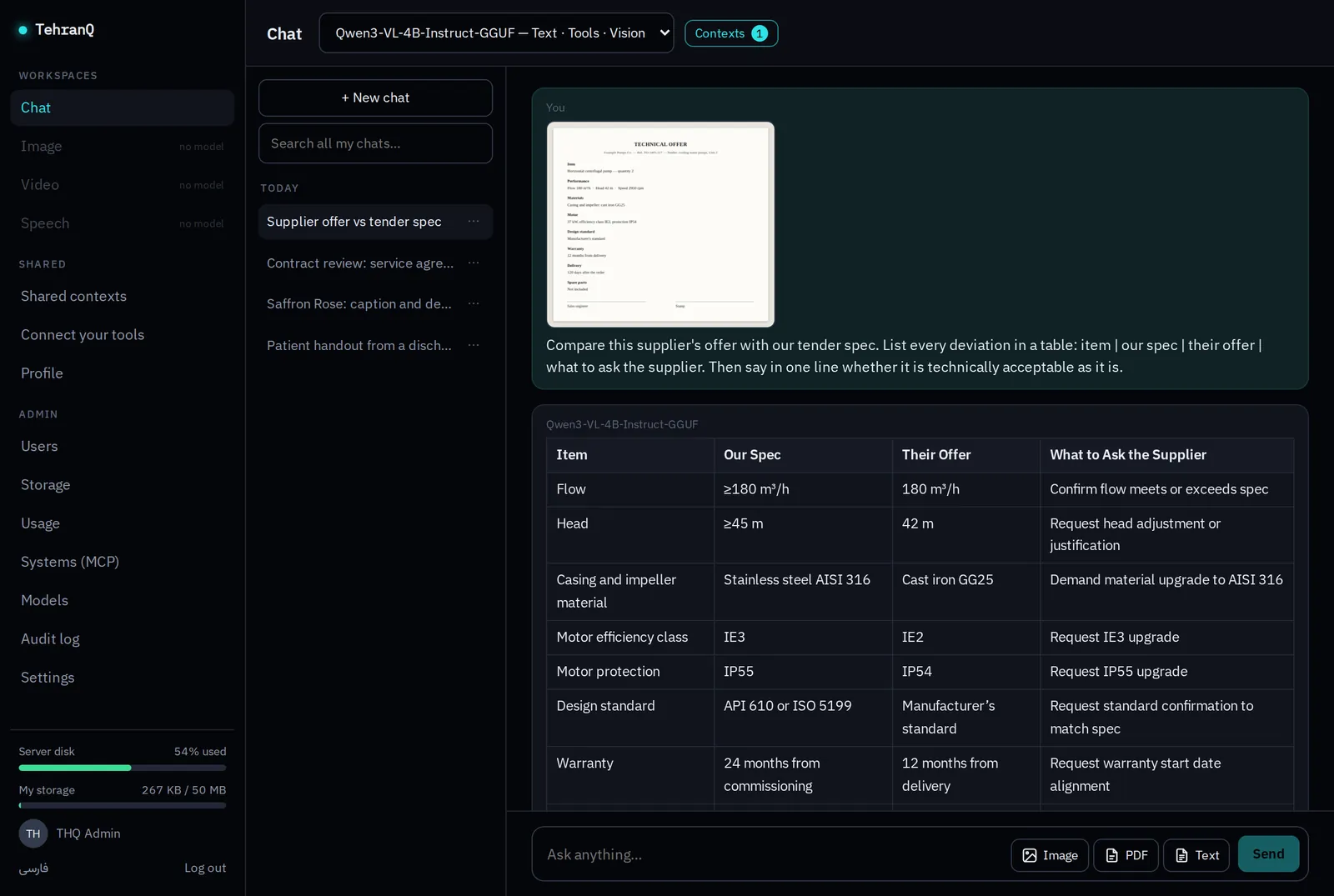
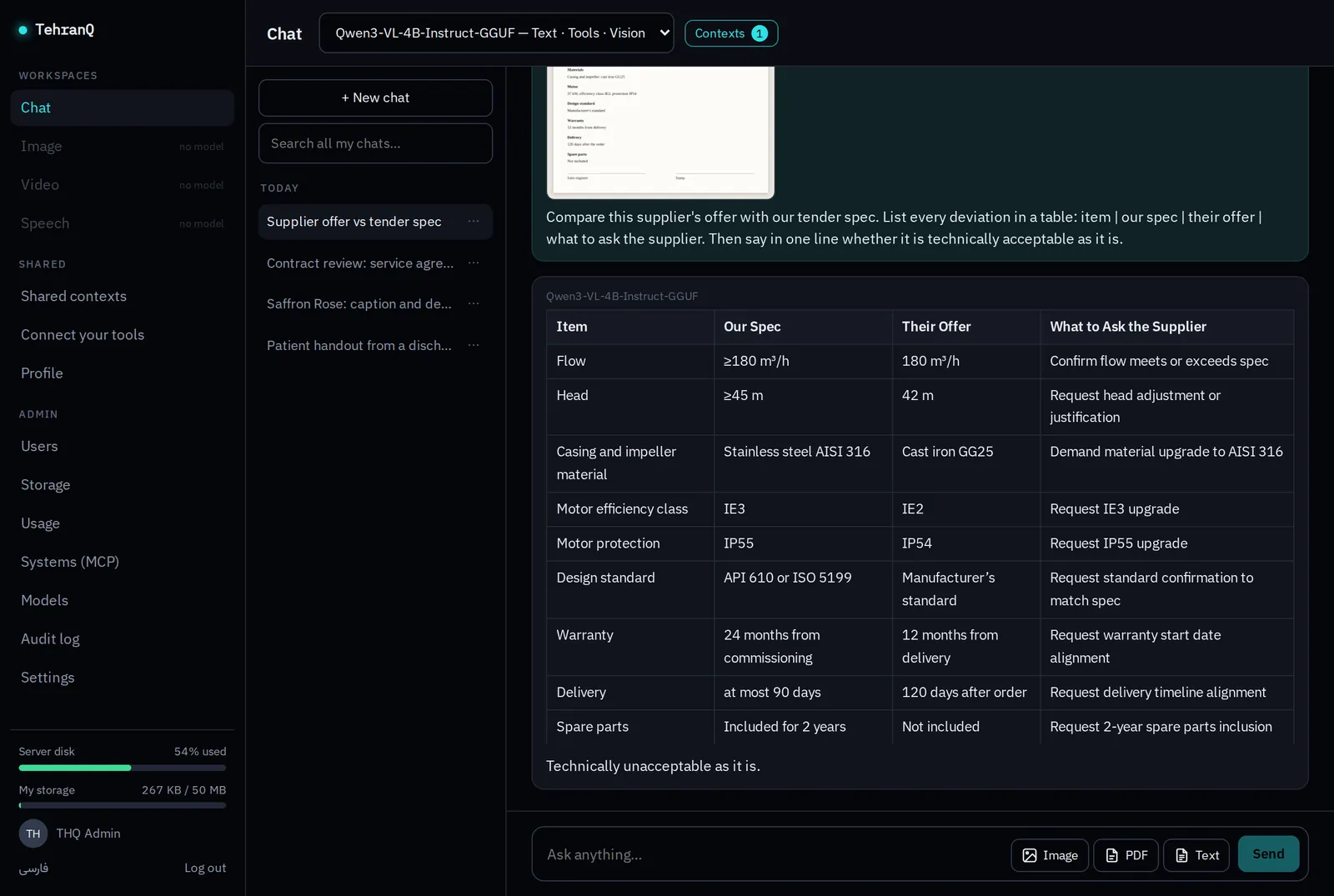
Answered by Qwen3-VL-4B, which reads images, on a laptop’s 6 GB GPU in about 8 seconds. A person checks every answer.
Concept images, made in the office
An exterior, an interior and a plan sketch, generated on a laptop’s 6 GB graphics card with FLUX.1-schnell, about a minute each, without sending a brief anywhere. Good for early concepts, mood and the first talk with a client; not for drawings anyone builds from.


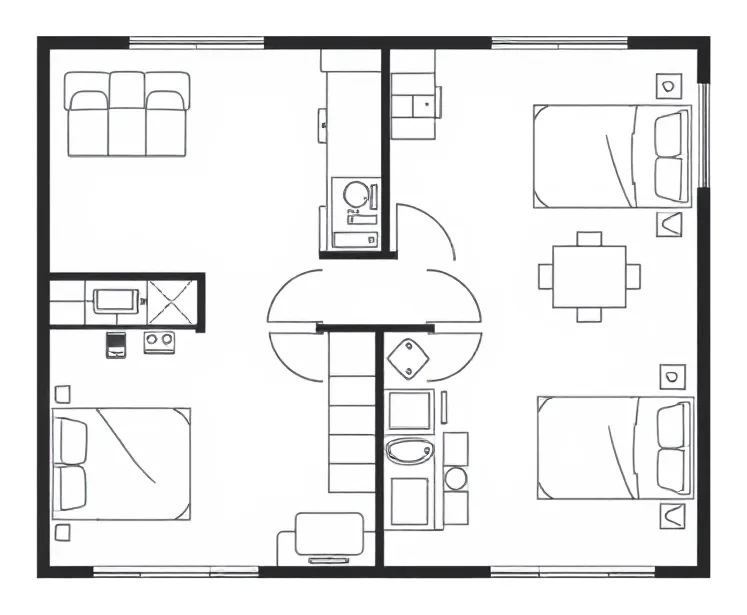
FLUX.1-schnell (Apache-2.0), open-weight, on a laptop with an RTX 2060 (6 GB). An architect draws the real thing; these make the first conversation faster.
Shared contexts an engineering firm keeps
- Project specs and the scope of work
- The clauses of the standards you work to, in their current edition
- HSE procedures and permit-to-work rules
- Templates for site reports, minutes and letters
- A glossary of Persian and English technical terms
Apps an engineering firm or plant might connect
- ERP and inventory
- Maintenance management: work orders and spare parts
- Project control and document control
- Procurement and supplier records
What it takes
A design office where a few engineers ask questions at a time starts on a 12 GB graphics card with an 8B model. A larger team working with it at the same time wants 24 GB or more: it follows how many use it at once, not the headcount. Transcribing site meetings is a load of its own, about 10–12 GB, and connecting your ERP or maintenance system needs a capable model, 14–35B. The System builder works out the machine.
Size your system →Where it falls short
It is not for structural, process or safety calculations: it can give a formula and a number that look right and are wrong, and nothing it says replaces an engineer’s check. It does not read CAD files, and a drawing exported to PDF gives it at most the text on the sheet. A photo or a screenshot of a drawing can go to a model that reads images, but treat what it reads as rough. Standards and procedures change, so keep the shared contexts current: it answers from what is in the chat, and an old edition gives old answers. Persian technical terms need checking. And the Workspace’s own chat does not reach your apps yet; that is done from the tools.
Questions engineering firms ask
Can it check our calculations?
Not structural, process or safety calculations. It can explain a method in general terms, but it makes arithmetic and unit mistakes while sounding sure. Calculations stay in your engineering software and with the engineer who signs them.
Can it read our drawings?
Not CAD files. A drawing exported to PDF gives it at most the text on the sheet. A photo or a screenshot can go to a model that reads images, which can describe it roughly; do not rely on it for dimensions or details.
Can it answer from our standards?
Yes, from the parts you put in shared contexts. It reads what is in the chat, as much as its context holds, and does not search a whole library by itself, so keep the relevant clauses there and replace them when a new edition comes out.
Does it work at a site with no internet?
The server itself needs no internet. People on site reach it from a computer or a phone over your company’s VPN, so the site needs a way onto your network. A plant with the server on its own network needs nothing more.
Is Persian technical language a problem?
It writes clear Persian, but technical terms are where it slips most. Keep a glossary of your own terms as a shared context, and check the terms in anything that goes to a client.
Other industries
Tell us about your business
Say what your team does and how many people; we will tell you what it would take — and if it is not worth it for you, we will say that too.
Request an assessment